
CatchEnglish organizes content you choose into English study notes built around sentences and vocabulary. Start from the web-service link on the Zrindy homepage. This guide follows the workflow described in the official product introduction; menus and available features may differ by device and version.
Choose your first study source
Begin with one short source on a familiar topic. The official introduction describes starting with a YouTube link, an audio file or a PDF.
- Open the available starting option on the product page. If prompted to sign in, use your own account.
- Choose the source type and check the formats and upload conditions shown in the current interface.
- Add your source and check note-generation progress. Look for an existing result before submitting the same source repeatedly.
Listen to a sentence and check its meaning
Generated notes organize subtitles, sentences and words into study units. Focus on a sentence you find difficult instead of trying to finish an entire long source at once.
- Read the original sentence and translation for the overall meaning.
- Use sentence replay and listening practice to hear the same passage again.
- Compare unexpected captions or translations with the source. Check the context before memorizing generated wording.
Connect vocabulary and quizzes to review
Vocabulary cards save meaning, pronunciation and examples with their context. Try a fill-in-the-blank quiz, then revisit saved words and sentences.
- Save the words and expressions you want to revisit from your study notes.
- Use a quiz or listening exercise to recall the expression yourself.
- On your next visit, find the previous note in the notebook dashboard and review it before adding another source.
If a source does not process or a note is missing
Check the source type, link availability, upload conditions and your current account first. Look for an existing result in your notebooks. If an error appears, note the source type and error message when contacting support. You do not need to send your password or the entire original private document.
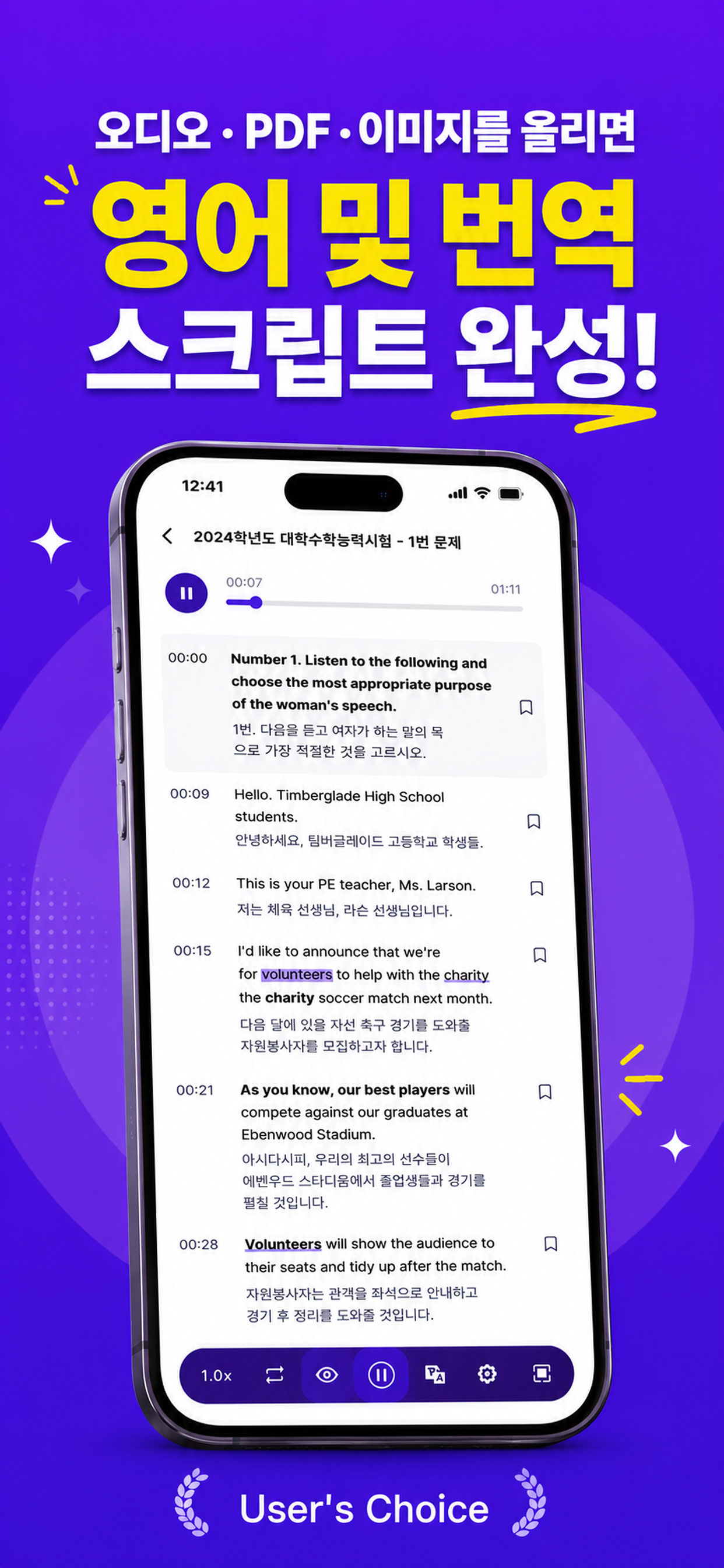
Official app previews
This product preview is published on the Zrindy website. The app shown in the image and the current web interface can have different menus and layouts.
Common questions
Which sources can I use?
The official introduction lists YouTube links, audio files and PDFs. Check the source types and upload conditions available in your current account and interface.
Are generated captions and translations always correct?
Audio quality, pronunciation and context can produce results that need checking. Compare with the source and verify expressions you do not understand.
Where can I check free access and usage limits?
Check the current pricing and usage screens in the product. This guide does not promise a particular free allowance, price or identical features across every device.
Does your screen look different?
The app changes over time. Include your app version and the steps you tried when contacting support. Do not send passwords, payment details or API keys.
dev@zrindy.com