

CodeRoom is an independent Mac app for viewing local Codex activity. It is not an official OpenAI app or billing statement and displays information available from its data sources.
Explore the menu bar and history
The menu-bar summary and detailed history provide different levels of information.
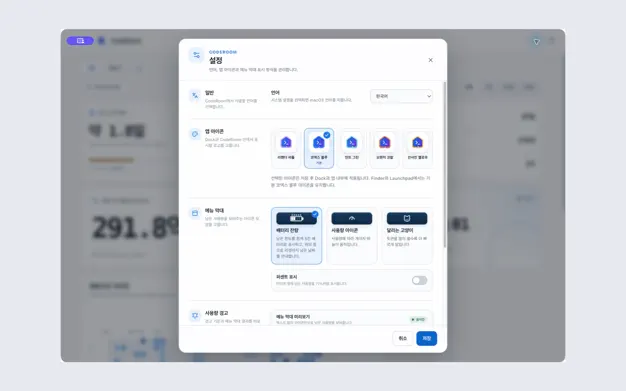
- Open CodeRoom and choose a menu-bar style such as a battery, gauge or cat.
- Check whether remaining limits and reset times are available. Treat missing values as unknown.
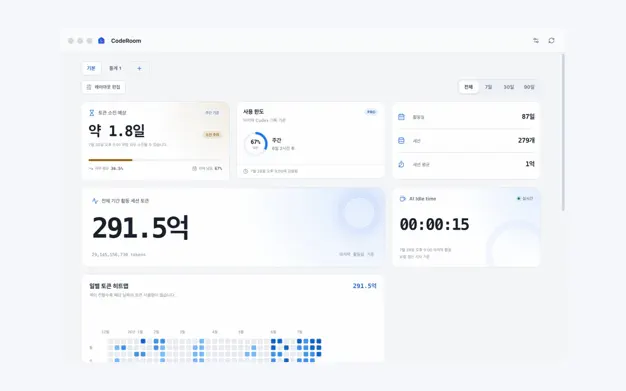
- Choose 7, 30, 90 days or all time and explore activity by model or project.
Interpret the numbers
Heatmaps, AI Active Time and token-runway estimates help explain activity. Local cost/token estimates should not be treated as the actual bill or official account limit.
Local data boundaries
According to the published app description, prompts, responses, code and credentials are not sent to a CodeRoom server. For support, share the visible error and app version rather than copying sensitive content.
If history or limits are empty
Check the period, model and project filters and whether local Codex activity exists. An unavailable limit does not mean zero usage or unlimited access. Verify exact billing and account state in the provider’s official interface.
Official app previews
These images come from the public App Store listing. Screens can differ by language, device and app version.
Common questions
Is this an official OpenAI app?
No. It is an independently provided Mac app.
Can I use estimated costs as an invoice?
No. Use the service provider’s billing records for actual charges.
Does your screen look different?
The app changes over time. Include your app version and the steps you tried when contacting support. Do not send passwords, payment details or API keys.
dev@zrindy.com